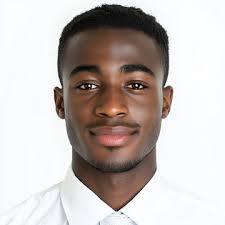
Use a plain, light-colored background (e.g., white, light grey).
No hats, sunglasses, or other obstructions.
Image should be in focus and good quality.
For sports directors who already have accounts, click top right on your profile and under "My Profile", upload a passport photo and "Update Profile & Affiliatioin".
Failure to provide a proper photo may result in registration rejection or delays.
For Sports Directors (Athlete Registration):
Before adding athletes to a team, please download the required Consent Forms from the event detail page (after you register your university for an event).
Each athlete will require the signed consent form to be uploaded.
Ensure you have digital copies of each athlete's University ID, National ID/Passport, and Birth Certificate ready for upload.
For inquiries or assistance, please contact:
|
+256770353835